A passport photo does not have to mean a trip to a photo booth. With a phone, a plain wall and a free online tool, you can take the photo at home, crop it to the size your country asks for, and print it on a standard 4x6 inch sheet.
This guide shows you how to take a good photo, how to crop it with our Passport Photo Maker, and what to check before you submit it.
Open the Passport Photo MakerWhat You Need
- A phone or camera. The main (back) camera usually gives a sharper photo than the selfie camera.
- A plain, light-colored wall, such as white or off-white.
- Good, even light. Daylight from a window in front of you works well.
- Someone to take the photo, or a phone stand and the camera timer.
How to Take the Photo
- Stand about half a meter in front of the wall, so you do not cast a shadow on it.
- Hold the camera at eye level, about 1 to 1.5 meters away, and face it straight on.
- Keep a neutral expression, with your eyes open and your mouth closed.
- Avoid shadows and glare. Light should fall evenly on both sides of your face. Turn off the flash if it causes bright spots.
- Leave space around your head and shoulders, so the photo can be cropped to the right size.
- Check the rules on glasses, head coverings and clothing for your country before you take the photo.
How to Crop It to the Right Size
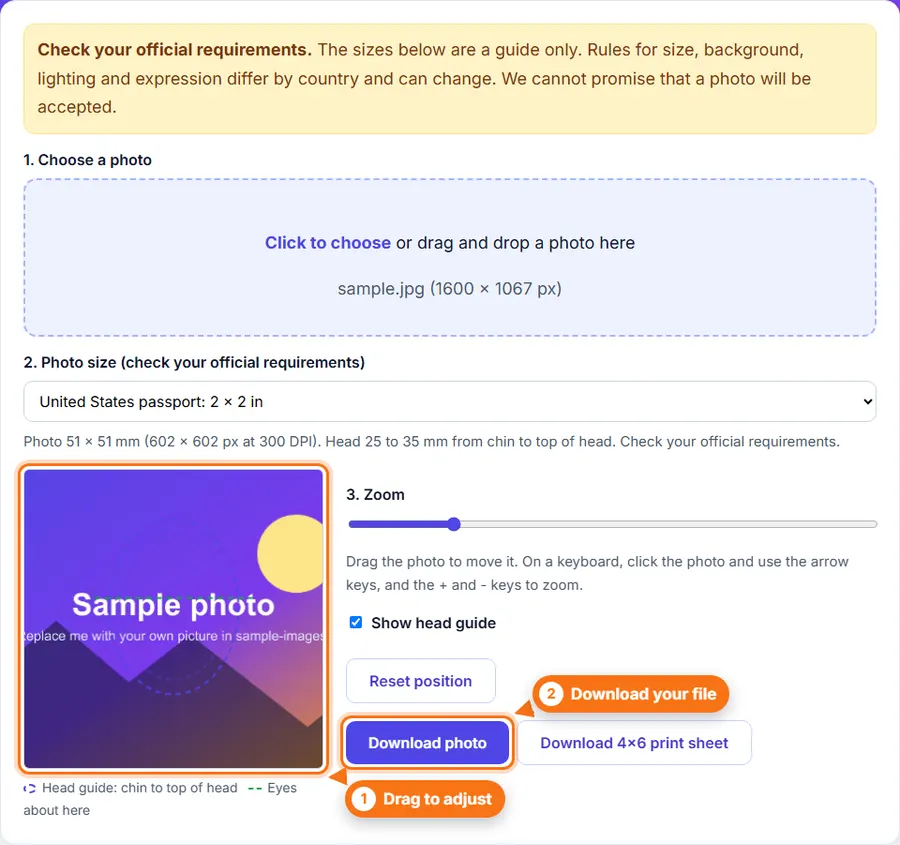
- Open the Passport Photo Maker.
- Choose your photo, or drag it into the upload area. It stays on your device and is not uploaded.
- Pick the photo size for your country.
- Drag the photo and use the zoom so your chin and the top of your head line up with the head guide.
- Click Download photo for a single photo, or Download 4x6 print sheet for several copies ready to print.
Common Passport Photo Sizes
These are the sizes in our tool. The pixel sizes are for printing at 300 DPI.
| Country or document | Photo size | Pixels at 300 DPI | Head (chin to top) |
|---|---|---|---|
| United States passport | 2 x 2 in (51 x 51 mm) | 602 x 602 px | 25 to 35 mm |
| United Kingdom passport | 35 x 45 mm | 413 x 531 px | 29 to 34 mm |
| Canada passport | 50 x 70 mm | 591 x 827 px | 31 to 36 mm |
| India passport | 35 x 45 mm | 413 x 531 px | 32 to 36 mm |
| EU passport (Germany, Italy, Spain) | 35 x 45 mm | 413 x 531 px | 32 to 36 mm |
| Spain ID card (DNI) | 26 x 32 mm | 307 x 378 px | 22 to 26 mm |
| Australia passport | 35 x 45 mm | 413 x 531 px | 32 to 36 mm |
Sizes are a guide only. Rules can change, so always check the official website for your passport or ID card.
How to Print Your Passport Photo
The 4x6 inch print sheet fits several copies of your photo on one standard photo print. You can:
- Print it at home on photo paper. In the print settings, choose actual size (100%), not "fit to page", so the photos keep their exact size.
- Order a 4x6 print at a photo shop, pharmacy or online print service. It is usually one of the cheapest prints you can order.
Cut the photos out carefully along the edges. Some applications ask for a digital photo instead of a printed one, so check which kind you need.
Before You Submit Your Photo
- Check the size, background color and head size against your country's official rules.
- Make sure the photo is sharp, in focus and not edited with filters or beauty effects.
- Use a recent photo that looks like you today.
- Keep your original photo, in case you need to crop it again for another size.
Make sure your photo meets the official requirements that apply to you; otherwise, it may not be accepted.
Frequently Asked Questions
1. Can I take a passport photo with my phone?
Yes, in most cases. Use the main (back) camera, good daylight and a plain light wall, then crop the photo to the right size. Some countries also have rules about digital photos, so check what yours asks for.
2. What size is a passport photo?
It depends on the country. The United States uses 2 x 2 inches (51 x 51 mm), while the United Kingdom, the EU, India and Australia use 35 x 45 mm, and Canada uses 50 x 70 mm.
3. Can I print a passport photo at home?
Yes. Download the 4x6 inch sheet and print it on photo paper at actual size (100%), not "fit to page", so the photos keep their exact size. A photo shop can also print a 4x6 sheet for you.
4. Will my passport photo be accepted?
No tool can promise that. Every country has its own rules about size, background, lighting and expression, and they can change, so always check the official requirements before you submit.
Related Tools and Guides
- Passport Photo Maker: crop to common passport sizes and make a 4x6 print sheet.
- Image Cropper: cut out just the part you need.
- Increase Image Size: meet a minimum file size for an online form.
- Image Compressor: get a photo under an upload limit.
More from the blog
- Facebook Image Sizes and Quality: How to Make Your Posts Stop the Scroll
- Instagram Image and Reel Sizes That Get Noticed in 2026
- Image Resolution Explained: Pixels, Dimensions and Quality
- How to Rotate or Flip an Image Online
- How to Resize Animated GIFs Online
- How to Resize an Image Without Losing Quality
- How to Compress an Image to 100 KB (or Any Size)
- PNG vs JPG vs WebP: Which Format Should You Use?