Free JPG to PNG Converter

Convert JPG images to PNG online, with support for up to 20 images at once, directly in your browser. No login required.

Click to choose or drag and drop images here

Why convert JPG to PNG?

Some apps, design tools and websites ask for PNG files. PNG is also a good format for editing, because it does not lose more detail each time you save it.

Things to know

Quick Method — JPG to PNG

How to convert JPG to PNG: choose your JPG files and click Convert. Then download each PNG.

The PNG will usually be larger than the JPG, and it will not bring back detail the JPG already lost.

Turn JPG Images into PNG

Some apps and design tools ask for PNG files. Add your JPG images, convert them, and download PNG files that will not lose more detail each time you save them.

Why Use This Tool?

Lossless Format

PNG does not remove more detail each time you save it.

Batch Conversion

Convert up to 20 JPG files at once.

Instant Download

Get each PNG as soon as it is ready.

No Login Required

Use it without creating an account or wasting time.

How to Use JPG to PNG Tool

  1. 1

    Choose up to 20 JPG files, or drag them into the upload area.

  2. 2

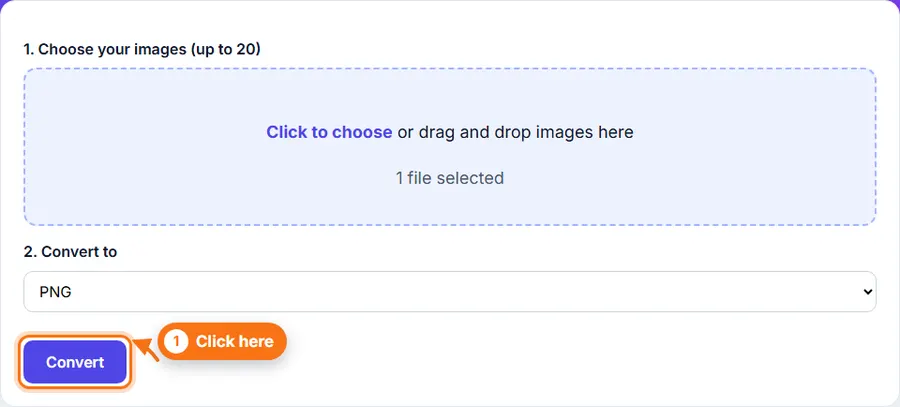
    Click Convert.

  3. 3

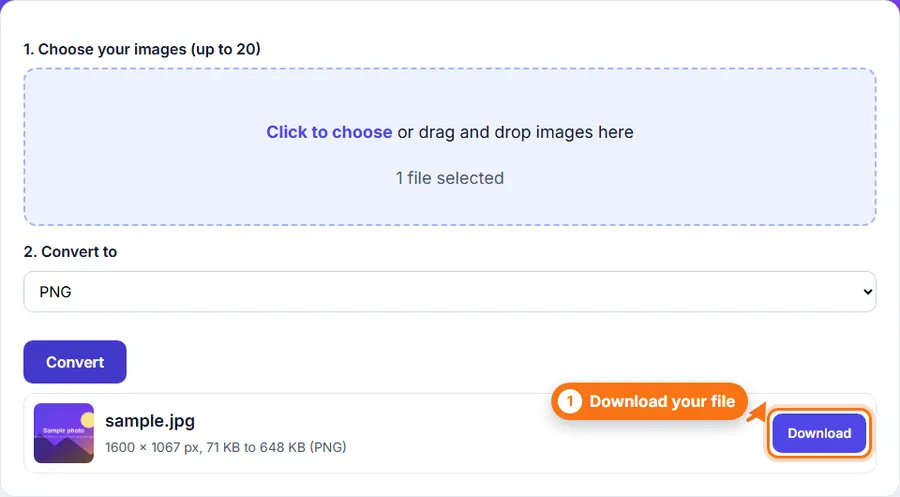
    Download each PNG from its row.

Step-by-Step Pictorial Guide — Easy to Use

  1. A file chosen in the JPG to PNG converter with the format and quality settings
    Step 1 A file chosen in the JPG to PNG converter with the format and quality settings
  2. The converted file listed with its new size and a Download button
    Step 2 The converted file listed with its new size and a Download button

Common Uses

Tips

  • Use this when an app or website asks for PNG files.
  • Keep your original JPG. The PNG is usually much larger.

Convert a JPG to PNG Without Complicated Software

You do not always need a desktop photo editor just to convert a JPG to PNG. FastestImageTools keeps it simple so you can make the change you need and get back to your work without unnecessary editing tools.

Frequently asked questions

Does converting to PNG improve the picture?

No. It does not bring back detail that the JPG already removed. It only changes the file type.

Why is the PNG so much bigger?

PNG keeps every pixel exactly, so photos saved as PNG are usually much larger than JPG.

Will the background be transparent?

No. JPG photos have no transparency, so the PNG will not have a transparent background.

Are my images uploaded?

No. Converting happens in your browser.

Was This JPG to PNG Helpful?

Your feedback helps us improve FastestImageTools.